Features
Every WebForms feature
WebForms is a hosted form backend. Point any HTML form at your endpoint and every submission is checked for spam, stored, and delivered to email, Slack, Discord, Telegram or your own webhook, with no server to run. Below are all 48 features, each with the plan it is on and a link to its documentation.
Screenshots are the real dashboard, filled with a sample design studio's forms. .
Features by plan
Free, and every plan
25 features300 submissions a month, no card required.
- Form endpoint
- JSON and AJAX
- Inbox and search
- Special fields
- CSV export
- Submission history
- Redirect and success message
- One form schema
- AI form builder
- Honeypot and time trap
- AI spam classifier
- Quarantine and review
- Learns from your corrections
- A reason for every decision
- Spam never counts
- Pitches lane
- Optional CAPTCHA
- Allowed domains
- Email notifications
- Delivery log
- Workspace overview
- Unlimited forms and sites
- AI agent tagging
- Agent-ready forms
- Generated types and OpenAPI
Pro adds
22 features12,000 submissions a month from $5 a month.
- Custom confirmation
- File uploads
- Unfinished form capture
- Sensitivity and languages
- Blocklists
- Double opt-in
- Digests and quiet hours
- CC and BCC
- Slack, Discord and Telegram
- Signed webhooks
- Zapier, Make and n8n
- Routing rules
- Retries and replay
- Autoresponder
- Your name on emails
- Email templates
- Team members and roles
- Extra seats
- White label
- Submissions API
- Write API
- MCP server
3 team members included · 6 months of history · Unlimited API keys
Agency adds
1 feature25,000 submissions a month from $12 a month, plus everything in Pro.
10 team members included · 1 year of history · Unlimited API keys
Collect submissions
Point any HTML form at your endpoint, or post JSON from your own code. No server to run.
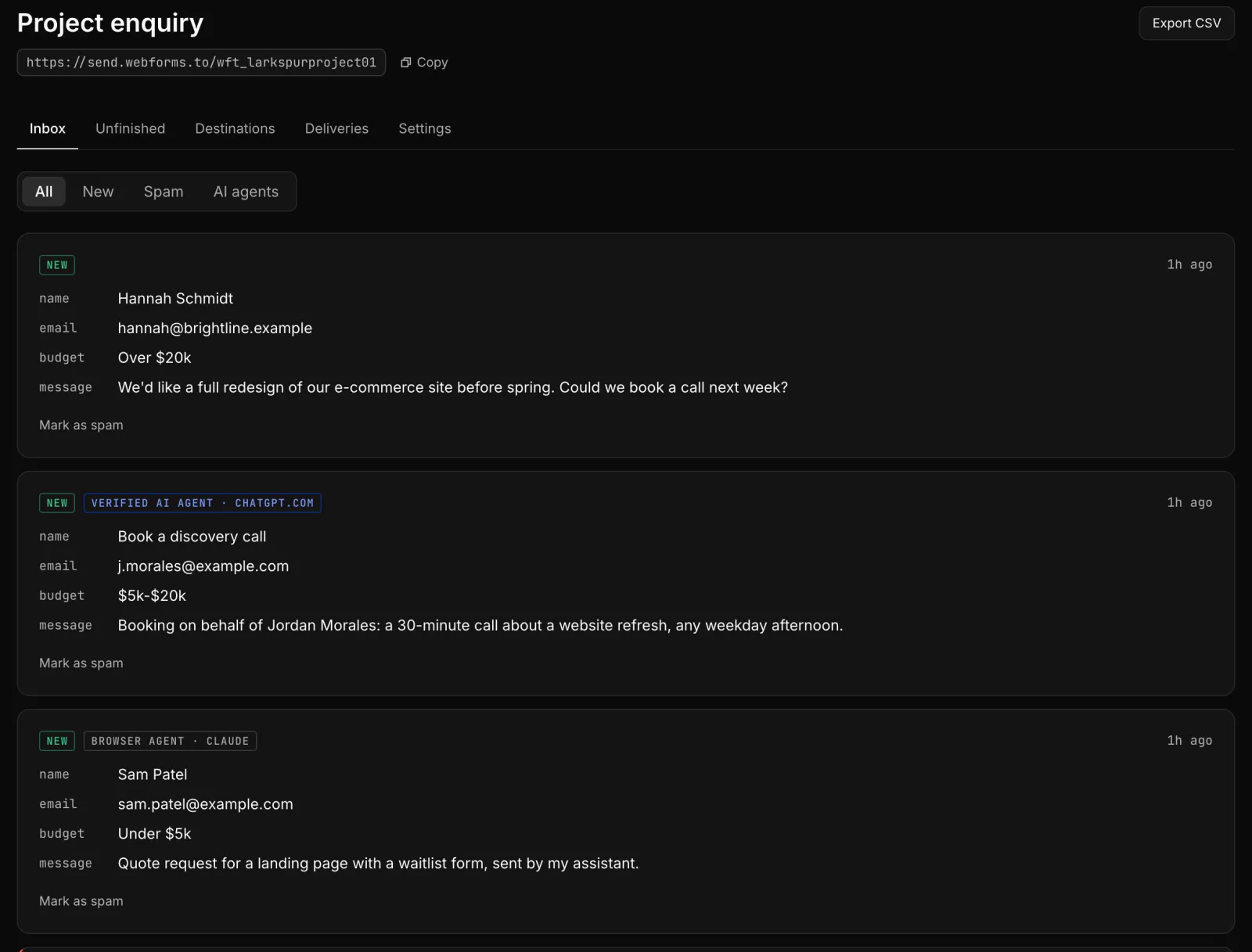
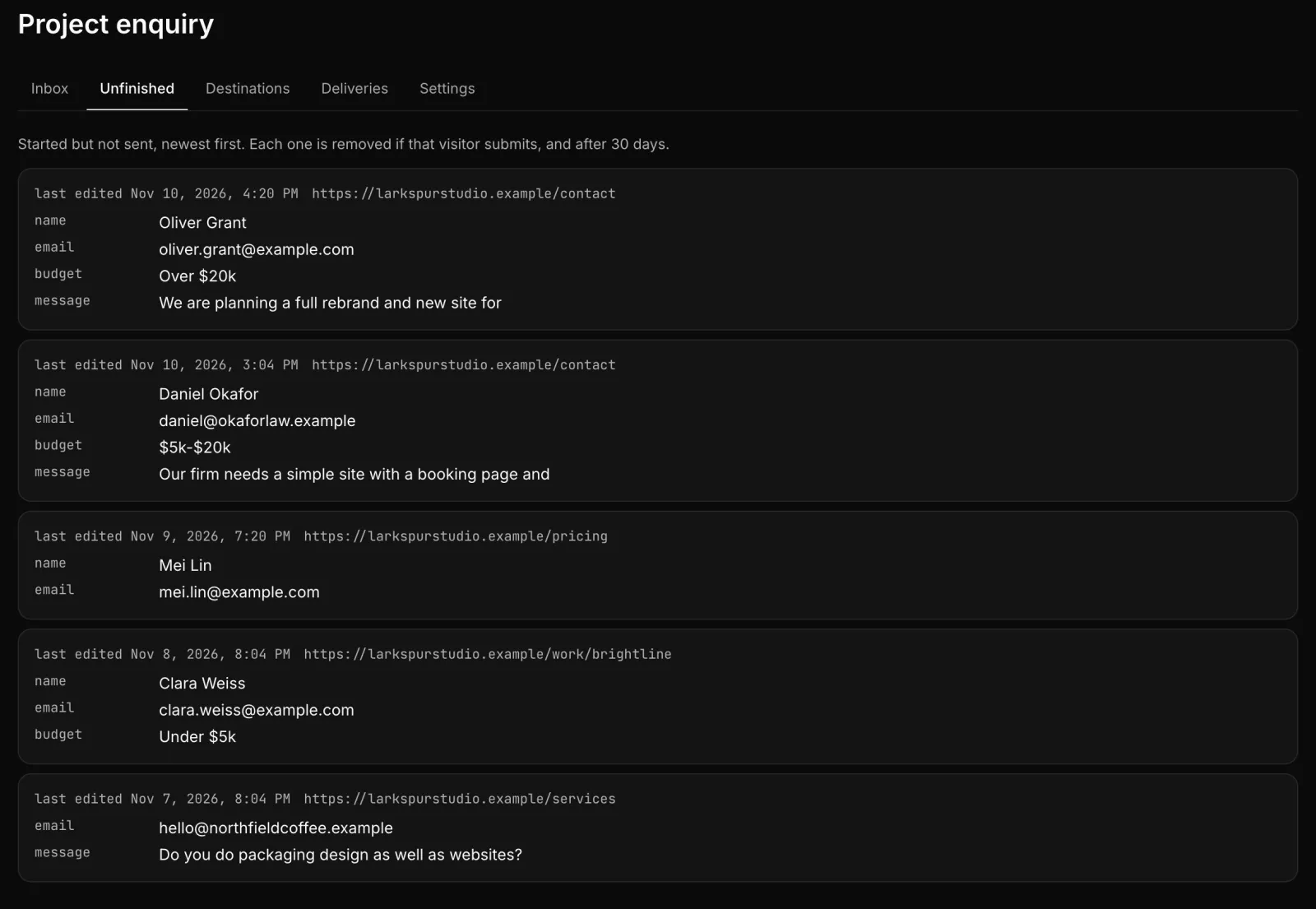
Form endpoint
Every planSet your form's action to your endpoint and submissions arrive. Works from any site or framework.
Docs →JSON and AJAX
Every planPost JSON or FormData with fetch and get a JSON response back, for forms that never leave the page.
Docs →Inbox and search
Every planRead, search, filter and export every submission in the dashboard.
Docs →Special fields
Every planSet the email subject, reply-to address and redirect from hidden fields in your own form.
Docs →CSV export
Every planDownload any form's submissions as a spreadsheet-ready CSV file.
Docs →Submission history
Every planSubmissions are kept 30 days on Free, 6 months on Pro and 1 year on Agency.
Plans →Redirect and success message
Every planSend people to your own thank you page, or show a message on ours.
Docs →Custom confirmation
Pro and AgencyYour own heading on the confirmation page, and JSON responses with your own fields.
Docs →File uploads
Pro and AgencyAccept attachments such as CVs and briefs, stored with the submission and linked in every notification.
Docs →Unfinished form capture
Pro and AgencyKeep what visitors typed into a form they never sent, so you can follow up.
Docs →One form schema
Every planDescribe the fields once to validate submissions and get JSON Schema, TypeScript, Zod and HTML from it.
Docs →AI form builder
Every planDescribe the form you need in plain words and get a working form and its fields.
Docs →
Stop spam without a CAPTCHA
Layered checks score every submission. Anything suspicious is held for review, never delivered and never counted against your plan.
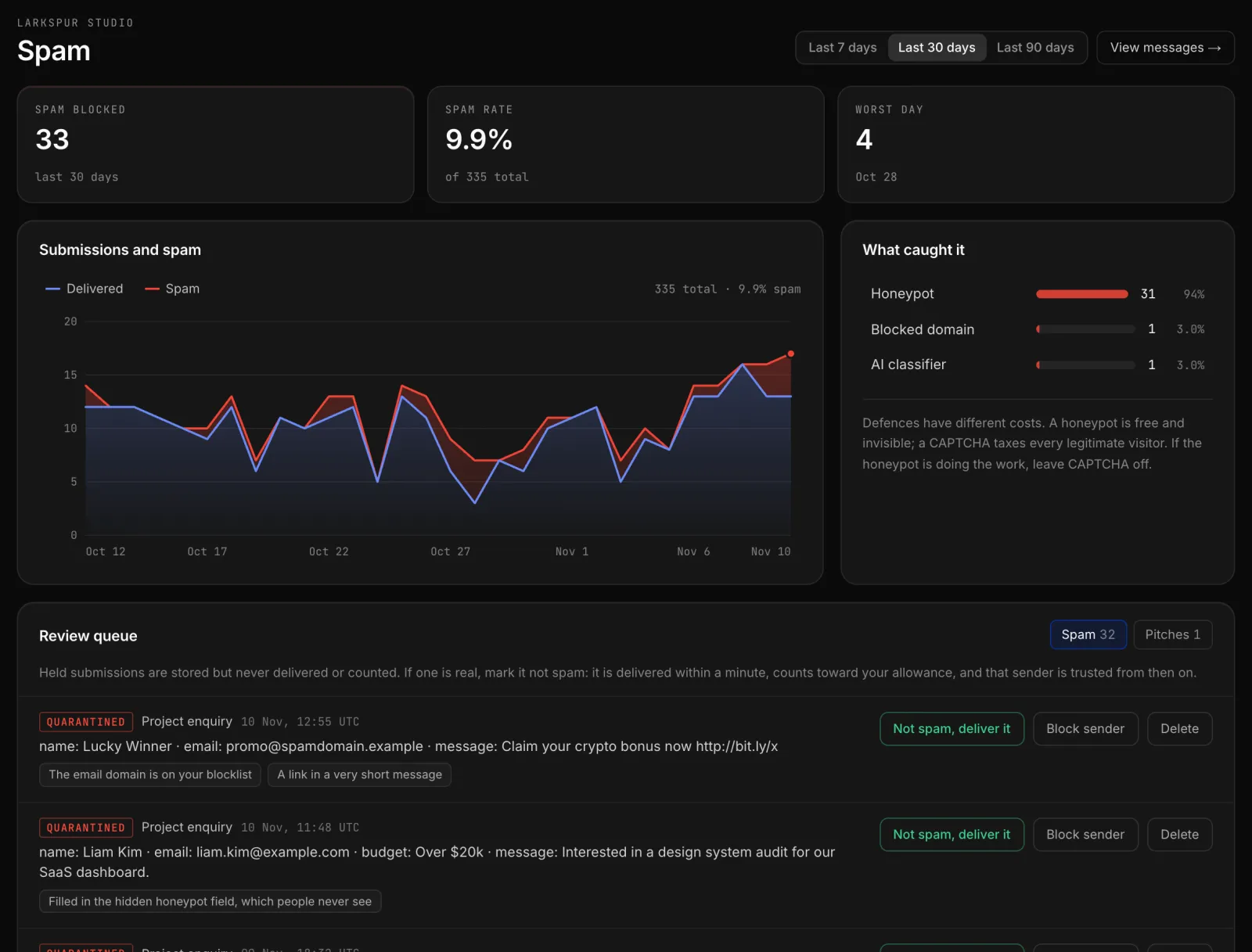
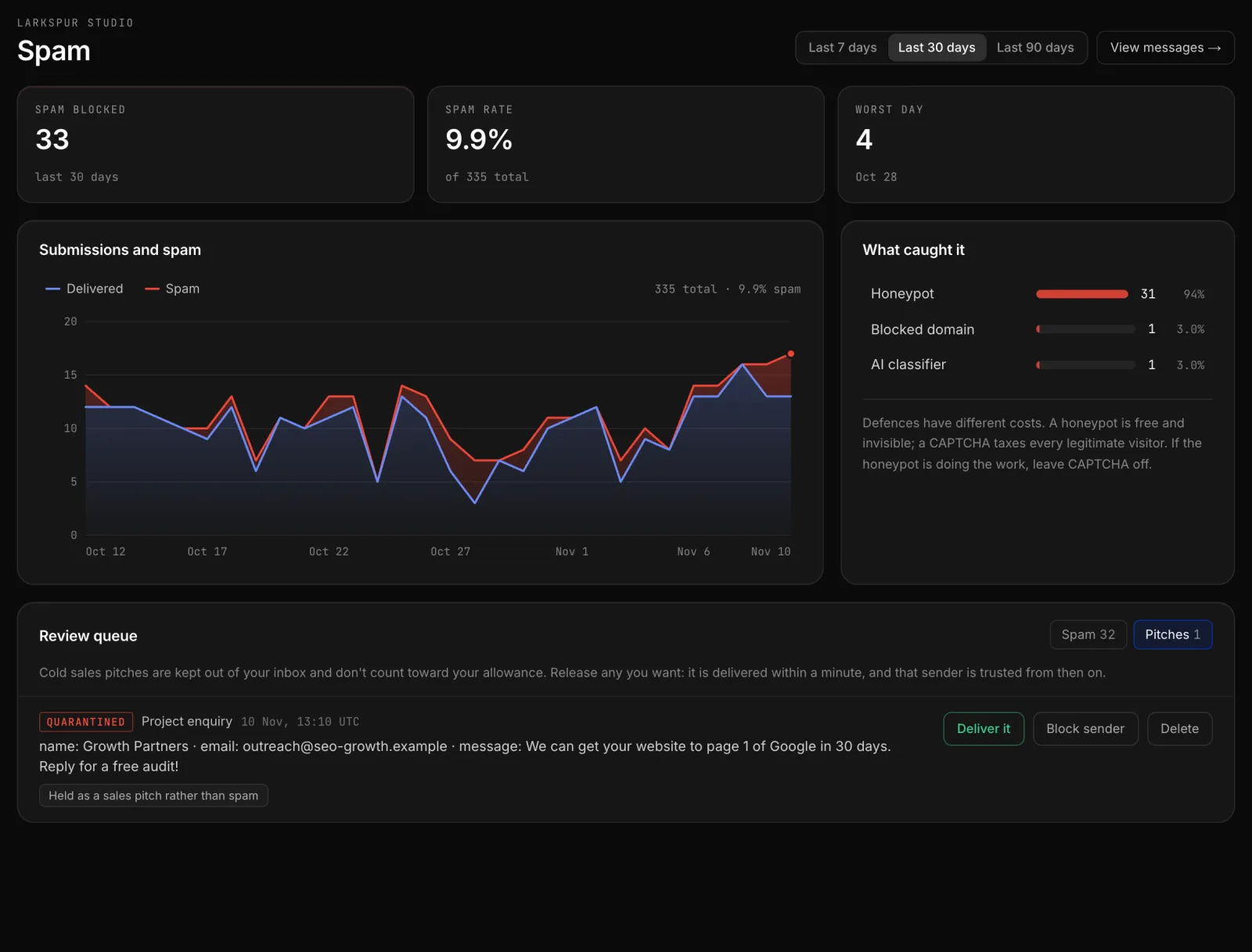
Honeypot and time trap
Every planInvisible checks that catch bots without asking real visitors to do anything.
Docs →AI spam classifier
Every planReads the message itself, so polished spam that passes simple checks is still caught.
Docs →Quarantine and review
Every planRelease a held submission with one click and it is delivered, and that sender is trusted from then on.
Docs →Learns from your corrections
Every planMark something as not spam and that sender is trusted on your forms from then on. Your corrections stay in your workspace.
Docs →A reason for every decision
Every planEach held submission says in plain words why it was held, so you can overrule it with confidence.
Docs →Spam never counts
Every planHeld spam and pitches are never delivered and never count toward your monthly submissions.
Docs →Pitches lane
Every planCold pitches from agencies and sellers are set aside instead of filling your inbox.
Docs →Sensitivity and languages
Pro and AgencyChoose how strict filtering is per form, and tell it which languages a form expects so genuine messages in them are never flagged.
Docs →Blocklists
Pro and AgencyHold submissions from the addresses and domains you name, and score the keywords you choose. Disposable addresses are flagged on every plan.
Docs →Optional CAPTCHA
Every planAdd a CAPTCHA to a form if you want one. Most forms never need it.
Docs →Allowed domains
Every planAccept submissions only from the sites you name, wildcards included.
Docs →Double opt-in
Pro and AgencyDeliver a submission only after the sender confirms their email address.
Docs →
Deliver it where you work
Send each submission to email, chat or your own systems, and decide which goes where.
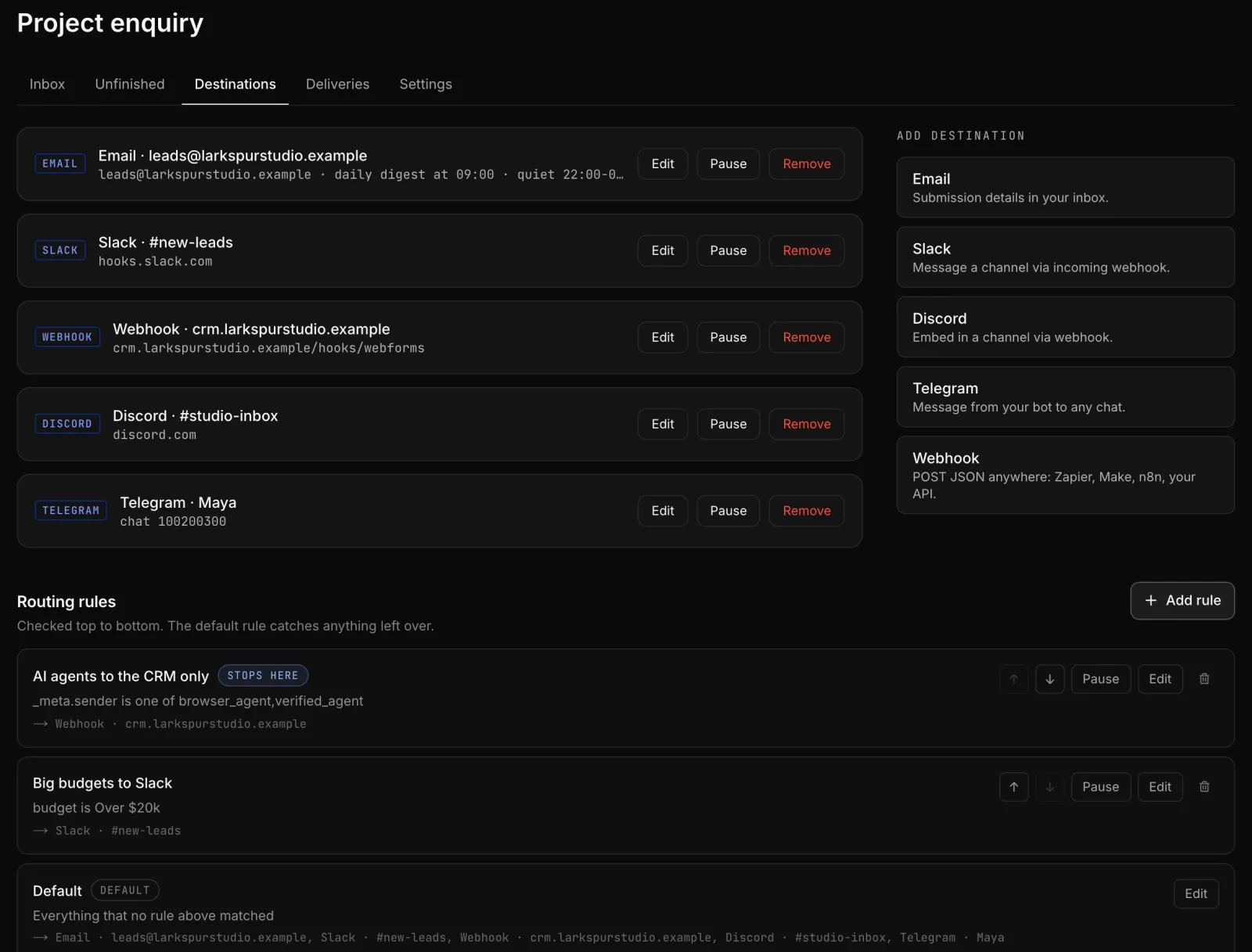
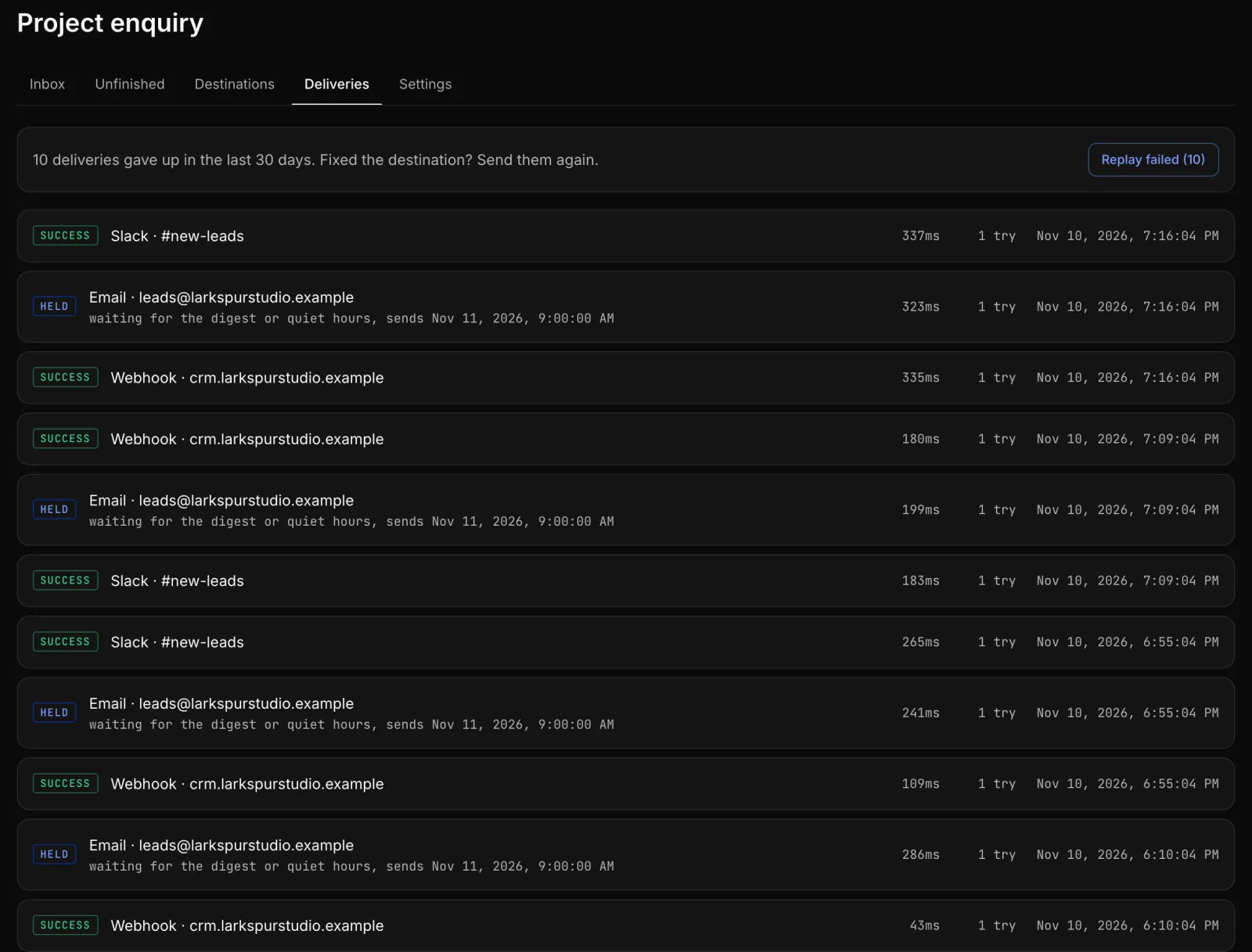
Email notifications
Every planEach submission emailed to you as it arrives, to one address or several.
Docs →Digests and quiet hours
Pro and AgencyGet one email an hour or once a day instead of one per submission, and no notifications overnight.
Docs →CC and BCC
Pro and AgencyCopy colleagues or a shared inbox on every notification.
Docs →Slack, Discord and Telegram
Pro and AgencyPost each submission to a channel or chat as it arrives.
Docs →Signed webhooks
Pro and AgencyPOST JSON to your own API, signed so you can verify every request came from us.
Docs →Zapier, Make and n8n
Pro and AgencyConnect a form to thousands of apps through the automation tools you already use.
Guides →Routing rules
Pro and AgencySend a submission to different destinations based on what was entered or who sent it.
Docs →Retries and replay
Pro and AgencyFailed webhook and chat deliveries retry on their own, and you can replay any that gave up in one click.
Docs →Delivery log
Every planSee every delivery to every destination, with its status, timing and attempts.
Docs →Autoresponder
Pro and AgencyReply to whoever filled in the form, personalised, plain or card style, in their language.
Docs →Your name on emails
Pro and AgencyNotifications and replies arrive under your brand's name.
Docs →Email templates
Pro and AgencyPremium notification styles, or your own template written by hand or drafted by AI.
Docs →
Teams, clients and insight
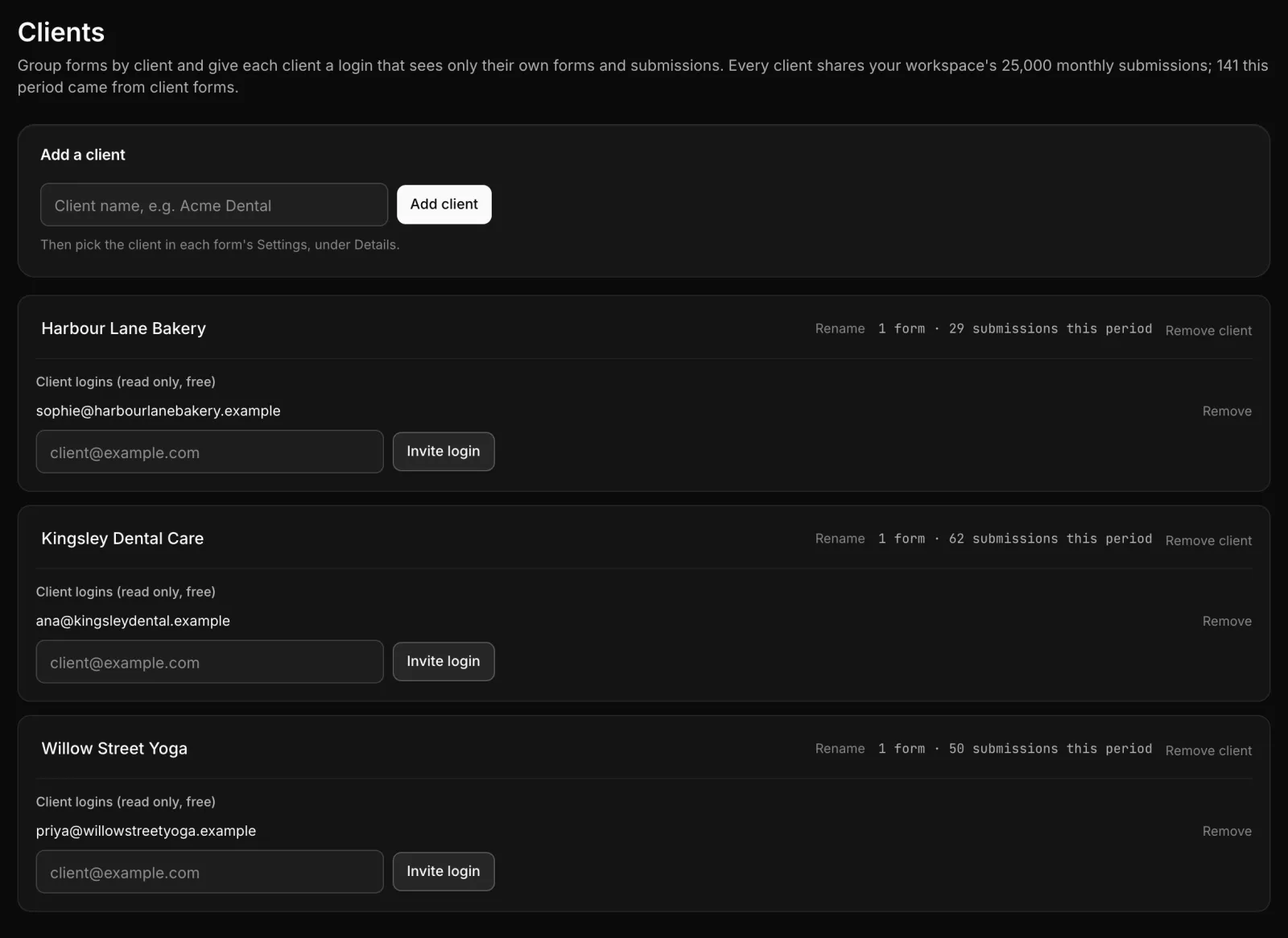
See how your forms are doing, invite your team, and give each client a login of their own.
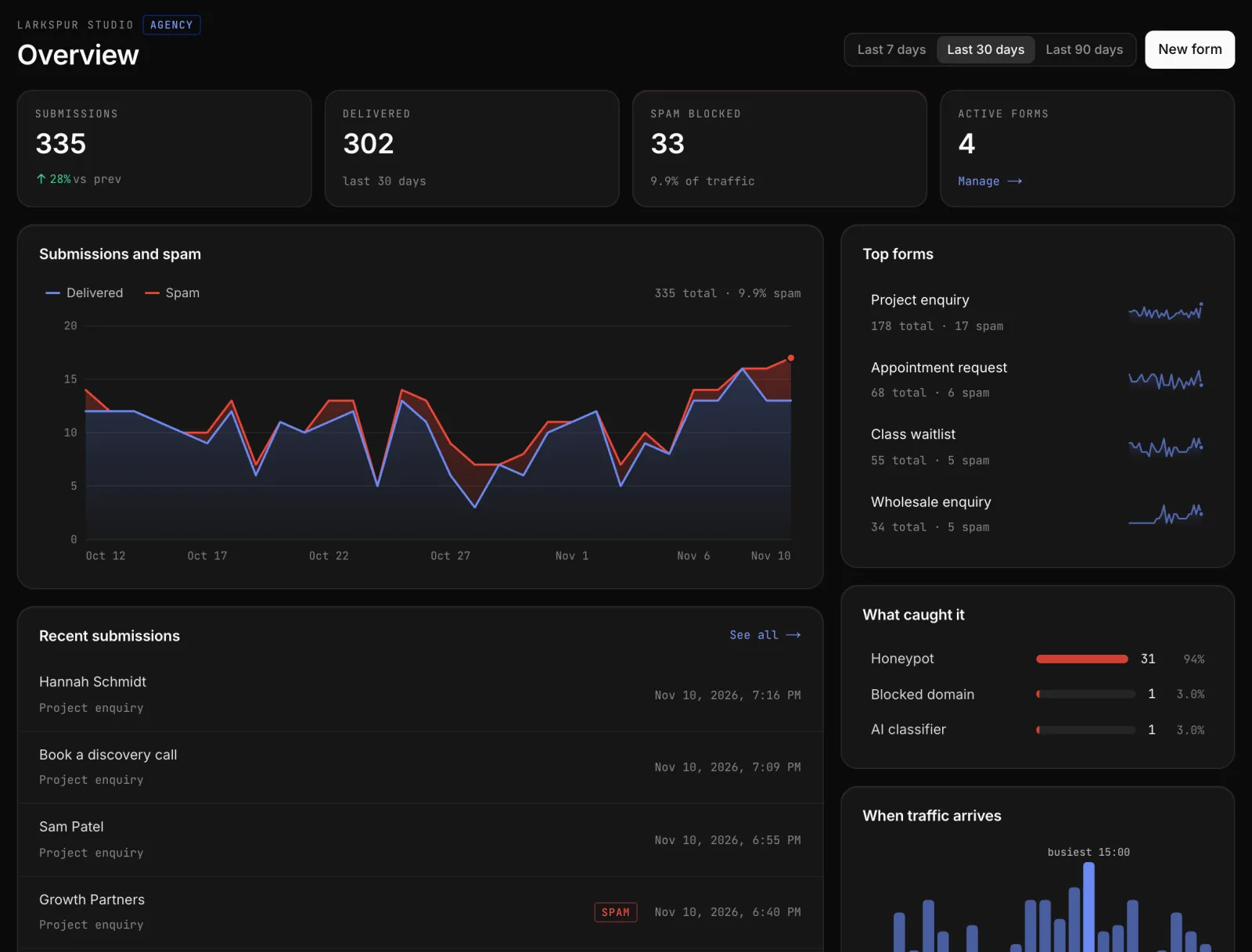
Workspace overview
Every planSubmissions, spam and delivery for every form, with trends and when traffic arrives.
Docs →Team members and roles
Pro and AgencyInvite teammates as admins or members, each with the access they need.
Docs →Client logins
AgencyGroup forms by client and give each client a free, read-only login on your one plan.
Docs →Extra seats
Pro and AgencyAdd teammates beyond your included seats for $29 a year each, without changing plan.
Plans →White label
Pro and AgencySend notification emails without WebForms branding, as an add-on to a paid plan.
Plans →Unlimited forms and sites
Every planCreate as many forms as you like and use them on any number of sites.
Docs →
Built for developers and AI agents
Everything in the dashboard has an API, AI assistants can manage your forms safely, and AI agents can fill your forms properly.
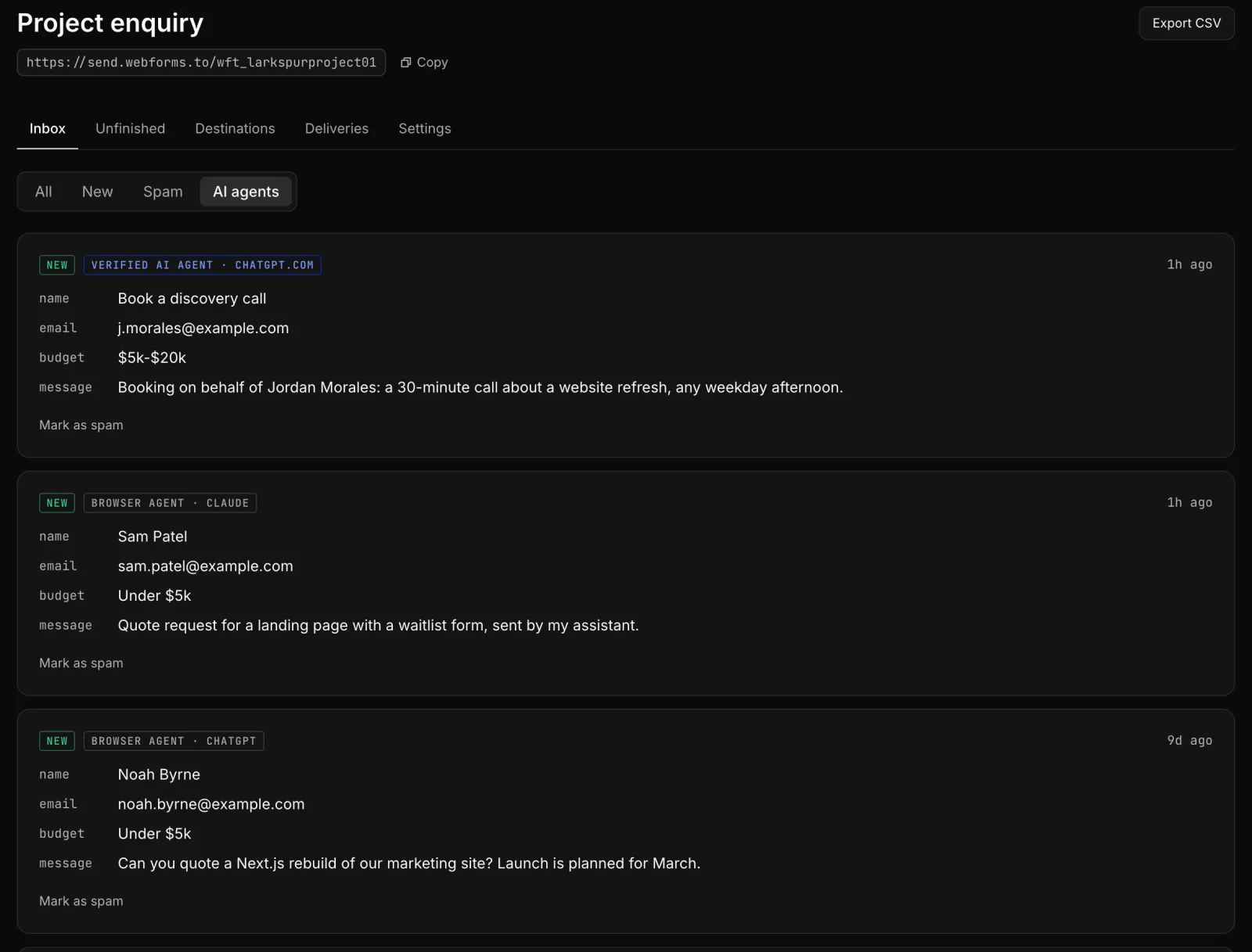
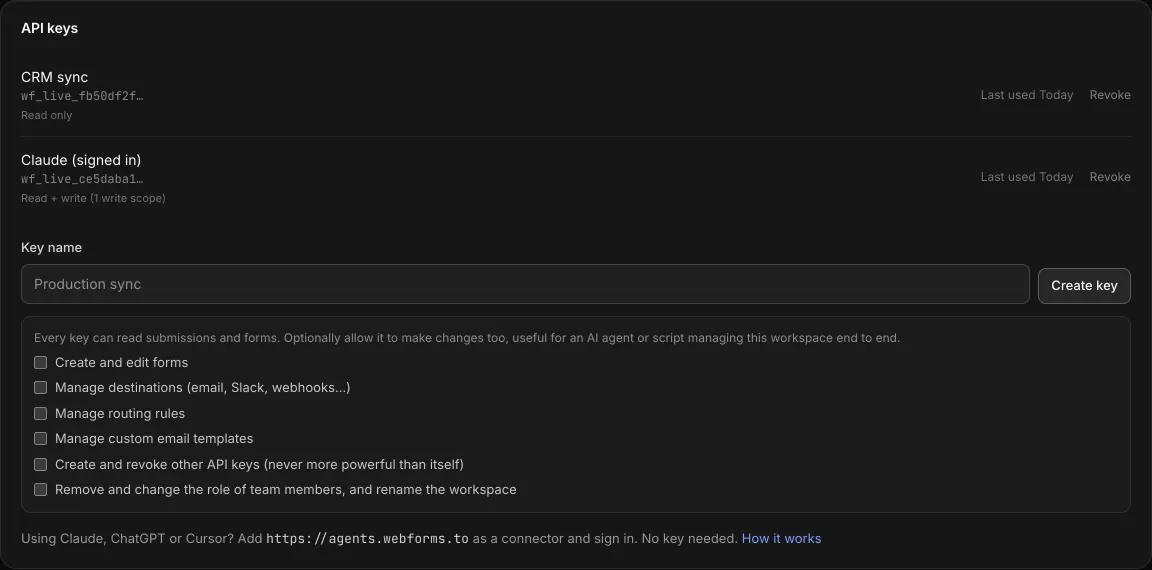
AI agent tagging
Every planKnow whether a person, a browser agent or a verified AI agent sent each submission, and route on it.
Docs →Agent-ready forms
Every planOne script tag lets AI agents discover and fill your form correctly, and get a clear answer back.
Docs →Submissions API
Pro and AgencyRead submissions and stats from your own code, with as many API keys as you need.
Docs →Write API
Pro and AgencyCreate forms, destinations, routing rules and keys from code, with scopes you choose.
Docs →MCP server
Pro and AgencyConnect Claude, ChatGPT or Cursor and manage forms by asking. It can never delete anything, and you get an email when one is connected.
Docs →Generated types and OpenAPI
Every planEach form publishes its schema and an OpenAPI description your tools can read.
Docs →
Questions about WebForms features
- What is WebForms?
- WebForms is a hosted form backend. You point any HTML form at your WebForms endpoint, and every submission is checked for spam, stored, and delivered to email, Slack, Discord, Telegram or your own webhook. There is no server or backend code to run.
- Which WebForms features are free?
- 25 of the 48 features are on every plan, including Free: spam filtering with an AI classifier, quarantine and the Pitches lane, instant email notifications, unlimited forms, CSV export, AI agent tagging, agent-ready forms and the form schema. Free covers 300 submissions a month.
- How does WebForms stop spam without a CAPTCHA?
- Each submission passes invisible checks, a honeypot field and a time trap, and an AI classifier reads the message itself. Anything suspicious is held in quarantine with a plain-language reason instead of being delivered, and held spam never counts toward your monthly submissions. You can still add a CAPTCHA to a form if you want one.
- Can WebForms send form submissions to Slack, Discord or a webhook?
- Yes. Pro and Agency send submissions to Slack, Discord, Telegram, signed webhooks, Zapier, Make and n8n, and routing rules decide which destination gets which submission. Free sends to email.
- Do I need JavaScript or a server to use WebForms?
- No. A plain HTML form with its action set to your endpoint works, and visitors are redirected to your thank you page or ours. If you prefer, you can post JSON or FormData with fetch and get a JSON response.
- Does WebForms work with AI agents?
- Yes. Every submission is tagged as sent by a person, a browser agent or a verified AI agent, and you can route on that tag. One script tag makes a form agent-ready, so agents can discover its fields and get a clear answer back. On Pro and Agency, an MCP server lets Claude, ChatGPT or Cursor manage your forms, and it can never delete anything.
- Does WebForms have an API?
- Yes, on Pro and Agency. The Submissions API reads submissions and stats, and the Write API creates forms, destinations, routing rules and API keys. Keys are read only unless you grant write scopes.
- Can my clients see their own form submissions?
- On the Agency plan, you can group forms by client and give each client a free, read-only login that sees only their own forms and submissions, all on your one plan.
Try it on your own form
Free for 300 submissions a month, with spam filtering included. No card required.